
PhpStormで256倍楽しくコードを書く方法(CodeIgniterの場合)
PhpStormとCodeIgniterを利用している場合、 PhpStormでautocompleteを有効にする方法(CodeIgniter3利用時) の方法で、autocompleteを有効にできた。
これで多少コーディングがはかどる。
もっと便利にできないだろうか?CodeIgniterでは**$this->**をたくさん記述する。
public function create()
{
    $this->load->helper('form');
    $this->load->library('form_validation');

    $data['title'] = 'Create a news item';

    $this->form_validation->set_rules('title', 'Title', 'required');
    $this->form_validation->set_rules('text', 'Text', 'required');

    if ($this->form_validation->run() === FALSE)
    {
        $this->load->view('templates/header', $data);
        $this->load->view('news/create');
        $this->load->view('templates/footer');

    }
    else
    {
        $this->news_model->set_news();
        $this->load->view('news/success');
    }
}**$this->**だらけだ。
$this-> のタイプにはShift操作もあり、なかなかのタイピングコストだ。
→ PhpStormで良い方法があった。
PhpStormのLive templates機能
PhpStormには、Live templatesという入力補助機能がある。forek を入力して、Command(CTRL)+Jすると、
foreach(  as  =>  ){

}
に変換してくれる。素晴らしい省力化だ。
Live templatesは
Fileメニュー / settings / Editor / Live templates
の設定画面からカスタマイズできる。
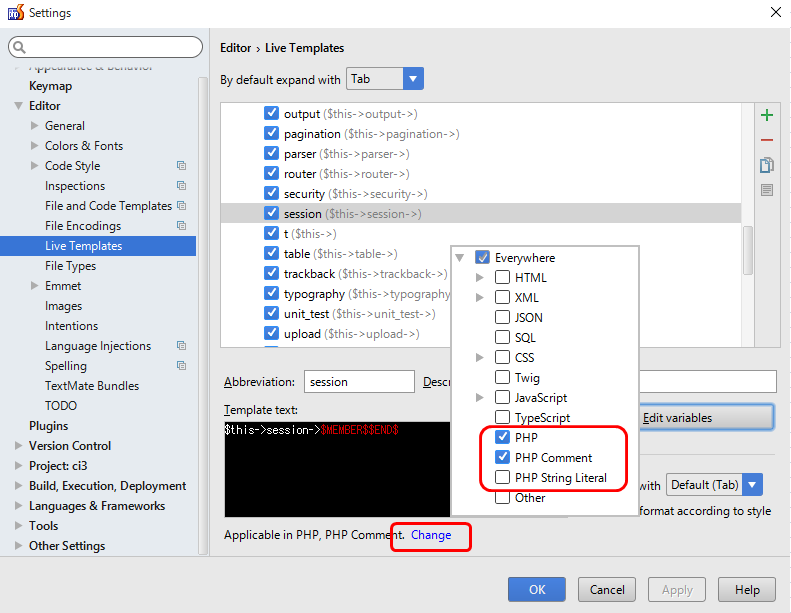
たとえば、sessionと入力すると$this->session-> と補完する設定はこうだ。

-
右上の「+」ボタンでTemplatesグループを追加する。
-
追加したTemplatesグループを選択し、再び右上の「+」ボタンでLive Templateを追加する。
-
設定中に次のテキストを入れる。
Abbreviation:短縮名 補完する際に入力する省略名。
Description:説明文 Command(CTRL)+J の際に表示される説明文。
Template text:補完後の文字列。
ここでTemplate textは
$this->session->$MEMBER$$END$-
$END$は補完後のカーソル位置を示す予約後。 -
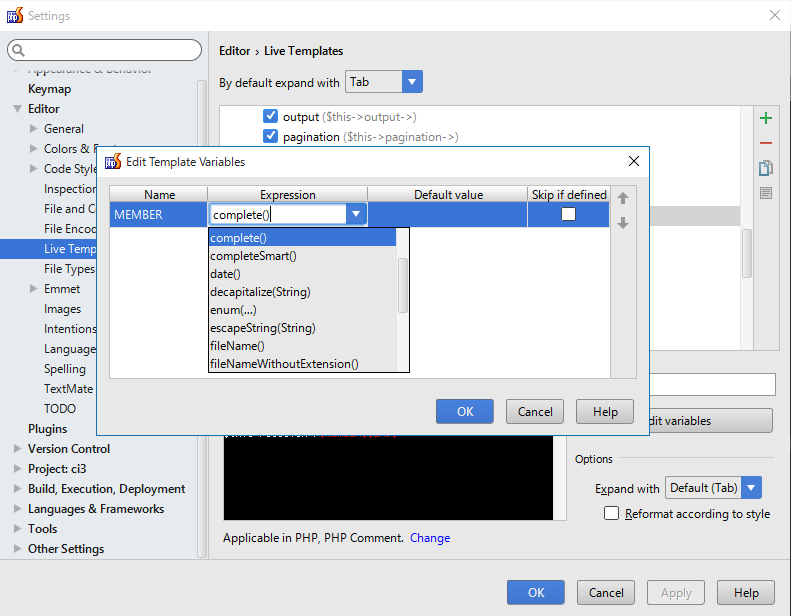
$MEMBER$は自分で定義した変数。Edit variablesボタンからでどんな変数か定義できる。
Edit variablesボタンを有効にするには、Applicable「Change」を押して、どの言語で有効なLive templatesか指定する。
この場合は、PHP・PHP Commentを選択した。
(次のスクリーンショットの赤枠の部分)
Edit variablesでのダイアログでは、先ほど定義したMEMBER変数の挙動を定義する。
ここでは、Expressionにcomplete()を選択した。complete()はLive templatesの補完後にさらにcode completion を呼び出してくれるようだ。
参考:
Predefined Functions to Use in Live Template Variables
complete() Invokes code completion at the position of the variable.
PhpStormでsessなど、snippetの一部の入力+Command(CTRL)+Spaceで補完が始まる。
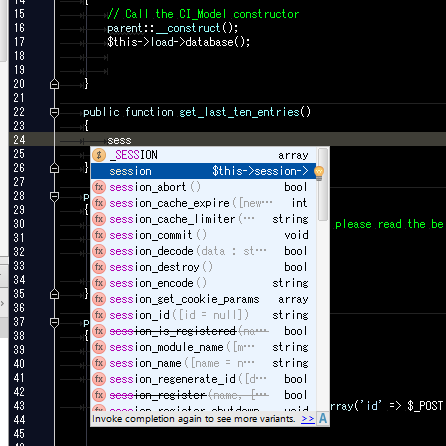 Command(CTRL)+JでもOKだ。

補完完了すると、sessionのメンバがsuggestされる!
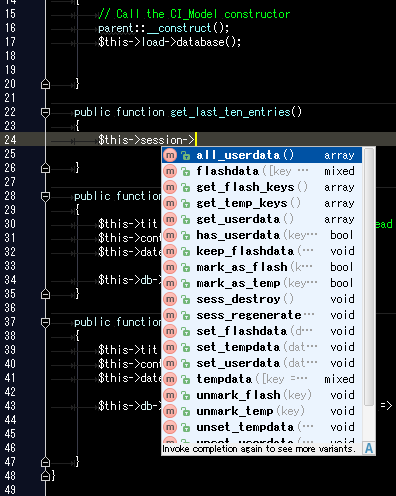
とても便利で省力化できる。
このLive templatesに$this->でよくアクセスするメンバを記載しておけば大変便利だ。
というわけで、次のsnippetを登録してみた。
| snippet | expand |
|---|---|
| t | $this-> |
| configitem | $this->config->item(“configname”) |
| view | $this->load->view(“name”) |
| library | $this->load->library(“name”) |
| helper | $this->load->helper(“name”) |
| model | $this->load->model(“name”) |
| database | $this->load->database() |
| benchmark | $this->benchmark-> |
| config | $this->config-> |
| controller | $this->controller-> |
| hooks | $this->hooks-> |
| input | $this->input-> |
| lang | $this->lang-> |
| load | $this->load-> |
| log | $this->log-> |
| output | $this->output-> |
| router | $this->router-> |
| security | $this->security-> |
| uri | $this->uri-> |
| db | $this->db-> |
| dbforge | $this->dbforge-> |
| dbutil | $this->dbutil-> |
| calendar | $this->calendar-> |
| $this->email-> | |
| encrypt | $this->encrypt-> |
| encryption | $this->encryption-> |
| form_validation | $this->form_validation-> |
| ftp | $this->ftp-> |
| image_lib | $this->image_lib-> |
| migration | $this->migration-> |
| pagination | $this->pagination-> |
| parser | $this->parser-> |
| table | $this->table-> |
| trackback | $this->trackback-> |
| typography | $this->typography-> |
| unit_test | $this->unit_test-> |
| upload | $this->upload-> |
| agent | $this->agent-> |
| xmlrpc | $this->xmlrpc-> |
| xmlrpcs | $this->xmlrpcs-> |
| zip | $this->zip-> |
| cache | $this->cache-> |
| session | $this->session-> |
※ t で $this-> となる超省略形も追加してみた。 個人的なお気に入りは t,db,sessionである。 また、これらの定義を追加するのは手間なので、次のGitHubに定義を公開中。
PhpStormのLive templatesの定義XMLファイルは次のフォルダに格納されているので、ここにXMLを保存すれば良い。
Windows: <your home directory>.<product name><version number>\config\templates
Linux: ~/.<product name><version number>/config/templates
OS X: ~/Library/Preferences/<product name><version number>/templates

ex.) Windows
C:\Users\ussername\.WebIde90\config\templates\CodeIgniter.xml
CodeIgniterのform_validationルール
CodeIgniterの$thisメンバを補完するLiveTemplateで記述し始めると、さらに欲が出てくるというもの。
$this->form_validation->set_rules( 'yname', 'Your name',<strong class="red">'required|max_length[1]|numeric'</strong>);form_validationルールを記載する場合、このruleを記憶していないため、毎回CodeIgniterリファレンスにお世話になる。
Form Validation Rule Reference — CodeIgniter 3.1.11 documentation Form Validation — CodeIgniter 3.1.11 documentation
ルールリファレンス フォームバリデーション(検証) — CodeIgniter 3.1.0-dev documentation
だが簡単なルールであれば、PhpStormがSuggestしてくれるとうれしい。
というわけで、ここでも有効なLive templatesを作成。
今回は、一覧表示されたほうが便利なので、「rule」とタイプするとForm Validation Ruleが表示されるようにした。
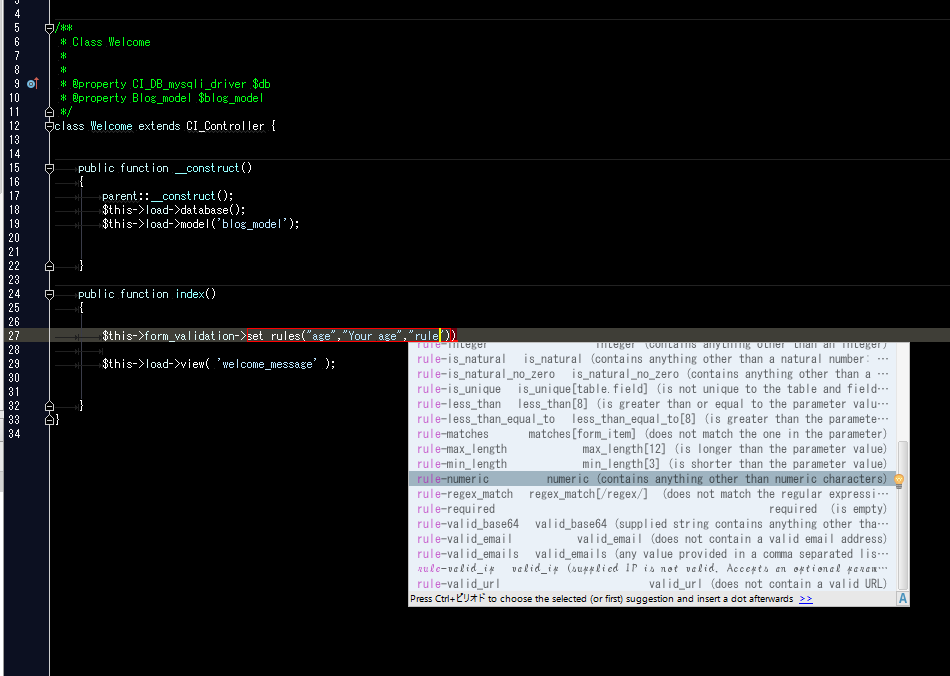
定義したルールは次の通り。
| snippet | expand |
|---|---|
| rule-required | required |
| rule-alpha | alpha |
| rule-alpha_numeric | alpha_numeric |
| rule-alpha_numeric_spaces | alpha_numeric_spaces |
| rule-alpha_dash | alpha_dash |
| rule-numeric | numeric |
| rule-integer | integer |
| rule-decimal | decimal |
| rule-is_natural | is_natural |
| rule-is_natural_no_zero | is_natural_no_zero |
| rule-valid_url | valid_url |
| rule-valid_email | valid_email |
| rule-valid_emails | valid_emails |
| rule-valid_ip | valid_ip |
| rule-valid_base64 | valid_base64 |
| rule-matches | matches[form_item] |
| rule-regex_match | regex_match[/regex/] |
| rule-differs | differs[form_item] |
| rule-is_unique | is_unique[table.field] |
| rule-min_length | min_length[3] |
| rule-max_length | max_length[12] |
| rule-exact_length | exact_length[8] |
| rule-greater_than | greater_than[8] |
| rule-greater_than_equal_to | greater_than_equal_to[8] |
| rule-less_than | less_than[8] |
| rule-less_than_equal_to | less_than_equal_to[8] |
| rule-in_list | in_list[red,blue,green] |
| rule-trim | trim |
| rule-htmlspecialchars | htmlspecialchars |
| rule-urldecode | urldecode |
これらの定義もGitHubで公開中。
このように、自分で定義したmodelやlibraryもLive templatesに定義すれば、きっと256倍楽しくコードを書くことができるに違いない。